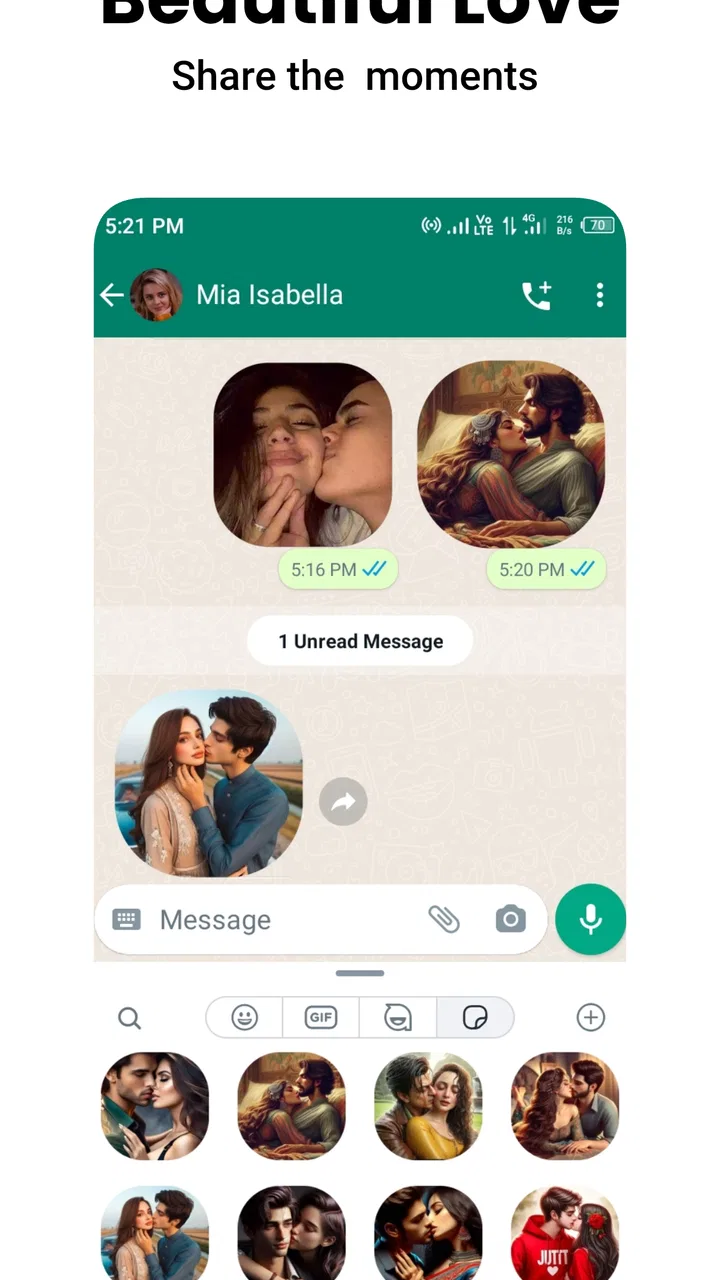
Romantic Stickers WASticker.ly
- 4.1
- Rating
- 10.00M
- Installs
- Free
- Price

 Analysis by App-foxy
I tried Romantic Stickers WASticker.ly as a focused communication app for adding affectionate images to WhatsApp conversations, and my first impression was simple: it is useful when ordinary text feels too flat, but it is also much narrower than a complete messaging tool. The experience depends heavily on how quickly I can browse, choose, and send a sticker at the right moment. When that flow works, a kiss, heart, or playful romantic image can make a short message feel warmer without forcing me to write a long explanation.
That narrow purpose is important. This is not an alternative to WhatsApp, a general social network, or a full sticker editor. It is a companion for people who already communicate through WhatsApp and want more romantic visual options. The app is free, aimed at Everyone, and developed by Future-Apps. Its store summary focuses on unlimited romantic stickers for expressing love, while the shorter description presents it simply as Romantic Stickers. I found that directness helpful: you can understand the basic idea quickly, although the real value depends on whether the available designs match your personal style.
How the sticker experience changes with connectivity
When I rely on a romantic sticker, connectivity affects more than how quickly an image appears: it can shape whether the reply still feels timely once it reaches the chat. I find it helps to choose a simple text response first when the conversation matters, then add a sticker if the handoff goes smoothly. That small change keeps the message complete even when the connection is unreliable.
You May Also Like

 Blood Strike: 2.5 Anniversary
Blood Strike’s Loadouts Turn Every Drop Into a Tactical Gamble
A close look at Blood Strike’s custom loadouts: how fast access to signature weapons reshapes its battle royale rhythm, rewards preparation, and narrows the gap between fights.

 Pandora - Music & Podcasts
Pandora’s Music Is Easy to Start, but Harder to Recover
Pandora’s strength is its low-effort path from a seed to a station. Its weak spot is how much confidence it asks you to place in connection, setup, and quiet recovery.

 8 Ball Pool
 Is Built on Rivalries, Rematches, and Routine
A close look at the rivalries, rematches, shared routines, and unanswered safety questions that turn a quick pool match into a persistent mobile community.

 Samsung Music
’s Quiet Strength Is Playing What You Already Own
Its reach comes less from spectacle than from dependable access to a personal library. That simplicity is both the app’s strongest retention engine and its ceiling.

 AccuWeather: Weather Radar
AccuWeather Review: A Quick, Clear Forecast for Everyday Decisions
For everyday plans, the best forecast is the one you can understand quickly. AccuWeather makes rain timing, radar, and local conditions easy to act on, with a few trade-offs.

 Hill Climb Racing
Why Hill Climb Racing Still Turns Crashes Into One More Run
A tiny car, a bumpy hill and one more upgrade: Hill Climb Racing keeps resurfacing because its simple chaos makes every near-miss feel personal.
More From Our News Desk



Why the network matters at the moment of sending
The most important part of using this app is not merely finding a sticker; it is completing the journey from selection to conversation. I would normally open the sticker app, look through the romantic options, choose an image, and move it into a WhatsApp chat. That means connectivity shapes the experience at several points. Browsing may feel smooth when the phone has a stable connection, while a weak mobile signal can turn a quick affectionate reply into a pause-filled task.
This matters most in spontaneous conversations. Imagine receiving a sweet message while commuting or while waiting in a crowded place. You may want to answer with a kiss or heart immediately, not several minutes later. If the sticker collection takes time to appear or the handoff to WhatsApp is interrupted, the emotional timing is lost. In my view, this is the app’s central trade-off: the stickers can make a response more expressive, but they add another step compared with typing an emoji that is already available in the keyboard.
I would therefore treat a reliable connection as part of the practical setup, especially when I am using the app for a fast reply. A sticker app is judged in seconds, not in long browsing sessions. If the path from opening the collection to sending the image feels delayed, I am more likely to return to WhatsApp’s built-in emoji panel. The app works best when I already know the kind of sticker I want and do not spend too long exploring.
Choosing images for different conversations
The romantic theme gives the collection a clear identity, but it also limits where I would use it. A heart or kiss can suit a partner, a close family member, or a playful private conversation, yet the same image may feel awkward in a group chat or with someone who prefers a more restrained tone. I would not install this expecting a broad library for work, gaming, friendship, or everyday reactions. Its strongest use is a personal chat where affectionate messages are already normal.
One useful habit is to think about the receiver before choosing the most dramatic design. A small heart can support a casual “good morning” without taking over the conversation, while a more elaborate love image may be better for an anniversary message or a private joke. The app’s focused theme makes this selection easier than searching through a huge general sticker platform, but it also means I have fewer neutral options when the mood changes.
I also prefer to choose a sticker that adds meaning rather than sending several similar images in a row. Because romantic collections can encourage repetition, restraint improves the result. One well-timed image beside a personal sentence feels more genuine than a stream of nearly identical hearts. That is a practical advantage of using the app as a visual accent instead of treating it as the entire message.
Using it in real mobile situations
On a phone, small decisions make a noticeable difference. If I am replying one-handed, walking, or switching between several chats, opening a separate app can feel less convenient than using WhatsApp’s own sticker or emoji area. The app is more comfortable when I have a moment to browse calmly, such as at home or during a break, rather than when I need to answer instantly.
A realistic scenario is a partner sending a message during the day that deserves more than a plain “miss you.” I can open the collection, find a suitable romantic image, and send it alongside a short sentence. That combination is where the app earns its place: the sticker supplies tone, while the text supplies the personal detail. If I send only a generic image, the reply can feel automatic; if I pair it with something specific about the conversation, it feels more intentional.
Screen size also affects the browsing experience. On a compact phone, several designs may look similar until I open or select one, so I need to slow down enough to avoid choosing the wrong mood. On a larger display, scanning the collection is easier, but the app still competes with the speed of WhatsApp’s own controls. I would not call it a replacement for built-in messaging features. I see it as a small add-on for moments when the standard choices do not express enough warmth.
What happens when the connection or handoff fails
Connectivity problems are especially frustrating because the action is so small. If a sticker does not load, I may not know whether the issue is the app, the phone’s connection, or the transition into WhatsApp. The best recovery approach is to avoid repeatedly tapping the same control. I would pause, check whether other online content is responding, then reopen the app or return to the chat and try again once.
That recovery routine sounds basic, but it protects the conversation from becoming cluttered with duplicate attempts. When a send action appears slow, tapping repeatedly can create uncertainty about whether the image was sent once, several times, or not at all. I prefer to check the chat before trying again. If the message is time-sensitive, a normal text or emoji is the safer backup because it uses the tools already open in WhatsApp.
Another practical tip is to decide on a fallback before starting a long search. If I am preparing a romantic reply, I can first write the personal sentence in WhatsApp, then look for a sticker. That way, a connection hiccup does not leave the conversation unanswered. The sticker becomes an enhancement rather than the only part of the response. This workflow is more dependable than opening the app first and postponing the actual message until the image is ready.
I would also avoid judging the app solely by one failed attempt in a crowded network environment. Mobile connectivity can change from one room to another, and the same action may behave differently on a stable home connection and a busy public network. Still, repeated delays would be a valid reason to use WhatsApp’s built-in alternatives instead. A decorative extra should not make basic communication harder.
Being careful with mobile data and attention
Even without treating the app as a large media platform, image-based browsing can use more data and attention than typing a message. I would be selective when connected through mobile data, especially if I am scrolling through many designs without a clear idea of what I want. The most efficient approach is to open it with a specific purpose: a good-morning image, a kiss, a heart, or something playful for a particular conversation.
This focused browsing style has two benefits. It reduces unnecessary loading and keeps the emotional choice connected to the message. Instead of wandering through every option, I can decide what feeling I need to express and stop once I find an image that fits. For people with limited data plans or unreliable mobile service, that discipline makes the app less frustrating than treating it like an endless gallery.
I would also consider the recipient’s situation. A large or visually busy sticker may be less convenient for someone checking messages quickly or using a smaller screen. A simple design is often easier to understand at a glance. The app’s romantic focus encourages expressive images, but expression does not have to mean visual excess. In everyday use, clarity and timing matter as much as decoration.
Privacy-conscious users should keep the app’s role in perspective. I use it to add visual material to a conversation, not to replace careful judgment about what I send and to whom. Romantic images can be harmless in one chat and embarrassing in another, particularly if a message is forwarded or viewed by someone nearby. The safest workflow is to confirm the chat before sending, especially when several conversations are open in WhatsApp.
How it compares with the usual alternatives
The closest alternative is WhatsApp’s own emoji and sticker functionality. Built-in tools are faster because they do not require me to leave the conversation, and they are usually the better choice for a quick reaction, a work chat, or a mixed group. This app has an advantage when I specifically want a concentrated romantic selection and do not want to search through unrelated categories.
General sticker apps offer more variety, including animals, jokes, celebrations, and expressive reactions. They are a better fit for people who want one broad collection for every kind of conversation. Romantic Stickers WASticker.ly is more appealing if romantic communication is the main reason for installing a sticker companion. The trade-off is obvious: its focused theme saves browsing time for affectionate messages but gives me less flexibility outside them.
Text, emojis, and GIF search also remain strong alternatives. Text is more personal, emojis are immediate, and GIFs can communicate movement or humor. I choose this app when I want a ready-made visual symbol that feels more deliberate than a single emoji but quicker than composing a long message. I would skip it if I rarely send romantic content, dislike switching between apps, or expect advanced customization and broad communication tools.
Who will get the most from it
The app suits someone who regularly chats with a partner and wants a larger supply of affectionate visual replies. It can also work for users who enjoy decorating routine messages such as greetings, congratulations, apologies, or “thinking of you” notes. Since it is free and carries an Everyone age rating, it is easy to consider as a low-commitment addition, although suitability still depends on how the recipient interprets romantic imagery.
I would be more cautious about recommending it to someone who wants neutral stickers, creator tools, detailed personalization, or a complete messaging experience. The app’s purpose is specific, and that specificity is both its strength and its limitation. If the collection does not match your preferred humor, language, or visual taste, the free price does not solve the problem of having to browse elsewhere.
Its audience size suggests that the idea has broad appeal: the app has passed ten million installs and holds an average rating of 3.6 from around eighteen thousand ratings. I read that as a sign of useful but not universally satisfying performance. The rating does not change my personal conclusion, but it fits the experience I had: the concept is straightforward and convenient in the right situation, while the extra step and dependence on a smooth connection can reduce its value for some people.
Version, device fit, and everyday expectations
The current version is 47.0, and the app supports devices running Android 8.0 or later. That makes it accessible to many people using older phones, which is helpful for a small communication utility that should not require a recent flagship. I would still keep expectations realistic on an older device: browsing image collections and moving between apps may feel less immediate than on newer hardware, particularly when the network is also busy.
Because it is an app rather than a standalone messaging service, its usefulness depends on fitting into an existing WhatsApp routine. I would install it only if I am comfortable with that extra layer between choosing a visual and sending it. Before relying on it for an important message, I would test the complete process in an ordinary chat: open the collection, select an image, transfer it to WhatsApp, and confirm that the result appears as intended.
That small test reveals more than browsing the store page. It shows whether the navigation feels natural on my phone, whether the designs are easy to distinguish, and whether the connection in the places where I normally chat is good enough. If those basics work, the app can become a handy shortcut for affectionate replies. If they do not, no amount of romantic variety will compensate for the friction.
My connectivity verdict
My overall view is positive but specific. Romantic Stickers WASticker.ly does one thing clearly: it gives WhatsApp users a dedicated source of romantic images for messages that need more feeling than plain text or a standard emoji. I like it most when I choose one sticker with a purpose, add a personal sentence, and send it through a stable connection. That workflow feels expressive without becoming complicated.
The limitations are equally clear. It is not the fastest option for every reply, it is not ideal for neutral or professional conversations, and a weak network can interrupt the emotional timing that makes a sticker worthwhile. Users who prefer built-in WhatsApp tools, broad sticker categories, or highly personalized designs may be happier with another option. I would also avoid depending on it as the sole way to answer an important message; keeping a text or emoji fallback is simply more practical.
For the right person, the free download makes experimentation easy. I recommend it to anyone who often sends affectionate WhatsApp messages and wants a more deliberate visual vocabulary than the usual emoji row. I would skip it if romantic stickers are only an occasional impulse or if switching apps feels like too much work. In my experience, its success comes less from the number of images than from timing, connection quality, and choosing a design that genuinely fits the conversation.
FAQs for Romantic Stickers WASticker.ly
01What is Romantic Stickers WASticker.ly used for?
Romantic Stickers WASticker.ly is designed to enhance your messaging experience by providing a collection of romantic-themed stickers. These stickers can be used on popular messaging platforms like WhatsApp to express feelings of love and affection in a fun and visually appealing way. It's perfect for adding a personal touch to your conversations.
02Is Romantic Stickers WASticker.ly compatible with all devices?
Romantic Stickers WASticker.ly is compatible with both Android and iOS devices, but it’s important to check the specific system requirements before downloading. Generally, it requires a relatively recent version of the operating system to function smoothly, ensuring that users can enjoy its full range of features without compatibility issues.
03Does Romantic Stickers WASticker.ly require an internet connection?
Once downloaded, Romantic Stickers WASticker.ly does not require an internet connection to use the stickers in your conversations. However, an internet connection is necessary to download the app and any additional sticker packs that might be available for purchase or free download within the app.
04Are there any costs associated with Romantic Stickers WASticker.ly?
The base app of Romantic Stickers WASticker.ly is typically free to download, but it may offer in-app purchases. These can include premium sticker packs or additional features. Users should check the app store for detailed pricing information and be aware of any potential purchases before downloading.
05How easy is it to add stickers from Romantic Stickers WASticker.ly to WhatsApp?
Adding stickers from Romantic Stickers WASticker.ly to WhatsApp is straightforward. After downloading the app and selecting your desired sticker pack, you can easily integrate them into WhatsApp with a simple tap. This seamless process makes it convenient for users to enhance their chats without technical hassle.
Pros
- Wide variety of romantic stickers
- Easy to integrate with WhatsApp
- Regular updates with new content
- User-friendly interface
- High-quality sticker designs
Cons
- Some stickers require in-app purchase
- Limited customization options
- Ads can be intrusive
- Not compatible with all devices
- Occasional app crashes

Romantic Stickers WASticker.ly
Gallery